



Vibe coding: if AI can build the app, why do you need a development company?
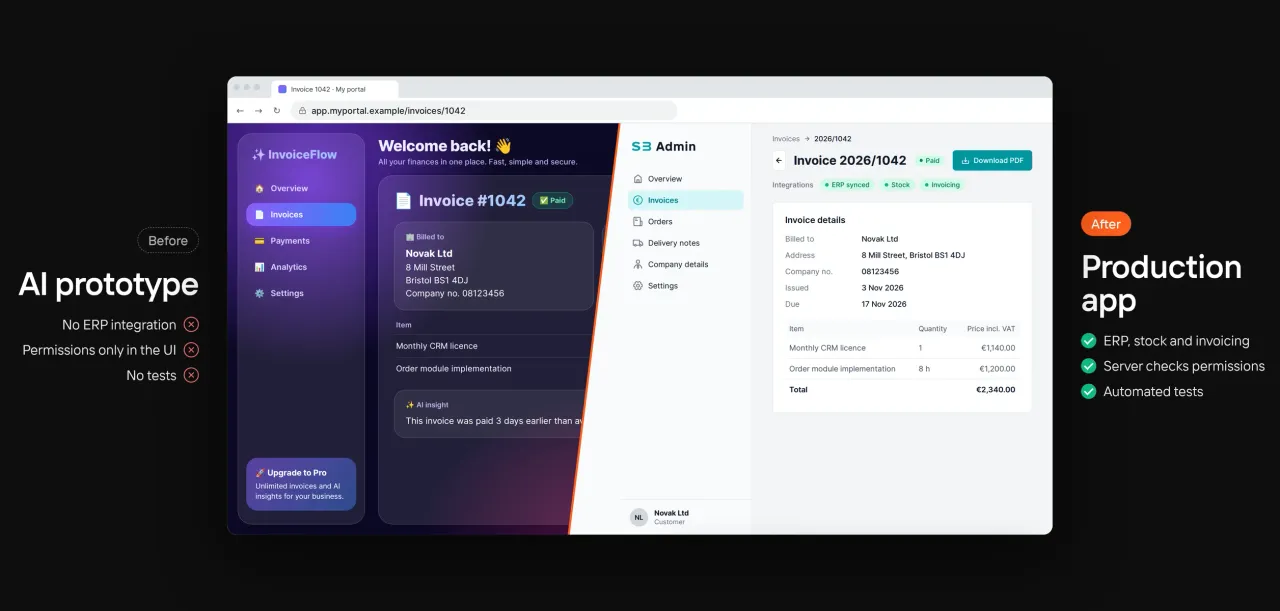
Only a few years ago you needed a programmer to build a web application. Today you can describe your idea to an AI and have a working prototype within a few hours. That is not the end of professional software development, but it does change what is worth paying for.
Imagine you have an idea for an app that would make your sales team’s work easier. You open an AI tool, describe what the app should do, and the AI starts generating code. A little later you have a login screen, forms, a clear dashboard and even a database.
You try a few features and everything works. You might well ask: Why should I pay thousands of euros for custom app development when AI can build it for me in an afternoon? Building an app that works the first time you test it is not the same as building an app a company can rely on every day. The difference only shows once real users, real data and connections to other systems are involved. We use AI in development too, but what makes the difference is experience and taste: knowing what to ask AI for and which of its suggestions to discard.
What is vibe coding and how does AI app development work?
Vibe coding is a way of creating software where, instead of writing code in the traditional way, a person describes to an AI what they want to build. The AI then generates or edits the source code according to the brief. You do not need to know a programming language or how the individual technologies work. You can simply type, for example:
“Build me a web app for keeping customer records. I need a contact list and the ability to add notes, filter customers and display statistics.”
From a brief like this, the tool prepares the user interface, the basic logic of the app and the database connection. Tools for this kind of development include Cursor, Lovable, Bolt and Replit. Vibe coding lowers the technical barrier between an idea and its first working version.
When is vibe coding all you need?
Not every app needs a large development team, a complex architecture and months of work. In some situations vibe coding is the most sensible route.
1. When you want to test a business idea quickly
Do you have an idea for a new digital product but do not know whether anyone will want it? With AI you can build a simple prototype, show it to potential customers and find out whether it solves their problem. That way you validate the core idea before you pay for full development.
A prototype like this does not need every feature or a perfect technical solution. Its job is to show how the product could work.
2. When you need a simple internal tool
Three colleagues need an app to track tasks, calculate commissions or keep an overview of internal requests. If the app does not handle sensitive data and an outage would not bring the company to a halt, a simple AI solution may be enough.
Even with internal tools, though, security and the way data is stored need to be assessed. A small number of users does not automatically mean a small risk.
3. When you want to show developers what you need
Communication often breaks down in software development. The customer knows what they need but cannot always describe it precisely, and the developer then interprets the brief differently.
A working AI prototype helps a great deal here. Instead of dozens of pages of documentation, you show how you imagine the individual screens, forms and user journeys. Vibe coding can therefore be a good starting point for professional development.
Where do the limits of vibe coding lie?
Problems do not usually appear the moment you first launch the app. They show up later, when more users log in, when you need to connect the app to another system, when the company’s processes change or when someone discovers a security flaw.
Security: an app that works is not necessarily secure
AI can generate a login form. That does not mean authentication, user session management and protection against unauthorised access are handled correctly.
Imagine a customer portal where clients view their invoices. The app runs smoothly and looks professional, but one customer discovers that by changing a number in the URL they can open another customer’s invoice. The cause is incorrectly set access rights, and you cannot spot a flaw like this by looking at the app.
That is why professional development also checks that each user can reach only the data and features they are authorised to use. A cybersecurity audit looks for exactly these flaws too, before a customer finds them.
GDPR and personal data: adding a consent checkbox is not enough
If an app processes names, email addresses, phone numbers, orders or other personal data, obligations under the GDPR apply. You need to answer questions such as these:
- Where and how is the data stored?
- Who has access to it?
- How long is it kept?
- How is its deletion or export handled?
- Which external services process the data?
- What is the procedure in a security incident?
AI can help implement technical measures, but generating an app does not in itself guarantee GDPR compliance. Compliance also depends on the purpose of processing, the legal basis, the processes in place and how the company uses the app.
Integrations: when the app has to talk to your ERP, warehouse or accounting system
A simple form or dashboard is one thing. Connecting several business systems is far more demanding. Take a B2B ordering portal connected to an ERP. The app has to be able to:
- load current stock levels,
- show each customer their own prices,
- transfer orders to the ERP,
- handle VAT and different currencies correctly,
- cope with connection failures and prevent duplicate orders,
- synchronise changes without losing or corrupting data.
AI can help build an API integration. But AI does not know your company’s business rules, and it may not know the specifics of the ERP system or the consequences of a faulty data transfer either. With integrations with ERP and other systems, most of the work therefore goes into making sure the systems work together correctly even in situations that did not come up in the first tests.
Performance: an app for five users is not an app for five thousand
An app can work perfectly in testing. Once more people start using it, though, database queries slow down, the server cannot keep up with requests and some operations start to fail. For an online store this can mean products loading slowly or problems completing an order.
That is why database optimisation, a suitable architecture, caching, monitoring and load testing also need attention. Not every app has to handle a million users, but it should handle the traffic it is built for.
Maintenance: who will fix the app in six months?
This problem is often forgotten in AI development. The app works today, but in six months you need to add a new login method, change the database or alter the business logic. In the meantime, libraries have been updated, an external service has changed its API and nobody knows the original code in detail any more.
AI can keep making changes, but without good architecture, documentation and automated tests, every further change can break existing features. Technical debt builds up and makes further development more and more expensive. The most expensive app may turn out to be the one that has to be rebuilt completely after a few months, even though its first version cost very little.
Checklist: is my AI app ready for real-world use?
Have you built an app with AI and are wondering whether you can start using it in your company or make it available to customers? Go through the following questions before launch.
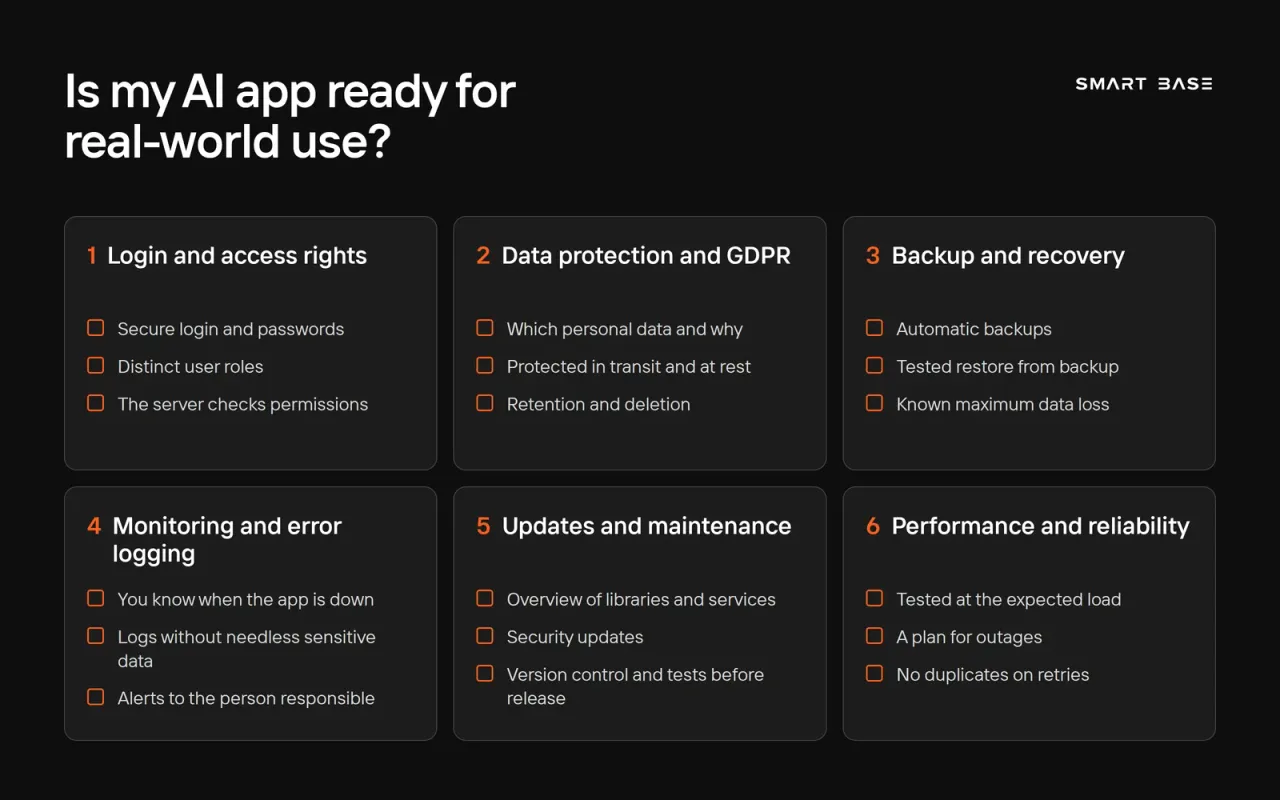
1. Login and access rights
- Do users have a secure login?
- Are passwords properly protected and never stored in readable form?
- Can the app tell an administrator, an employee and a customer apart?
- Does the server check permissions, or does the user interface only hide them?
- Can a user’s access be revoked safely?
2. Data protection and GDPR
- Do we know what personal data the app processes and why?
- Have we identified a legal basis for the processing?
- Is data adequately protected both in transit and at rest?
- Have we sorted out data retention and deletion?
- Do we know every external provider that has access to the data?
3. Backup and recovery
- Are automatic backups created?
- Do we know where they are stored and who has access to them?
- Have we tested restoring the app and the database from a backup?
- Do we know the maximum amount of data we could lose in an outage?
4. Monitoring and error logging
- Can we tell when the app stops working properly?
- Are technical errors and important events logged?
- Do the logs contain enough information for diagnosis without needlessly storing sensitive data?
- Does the person responsible get an alert when a serious problem occurs?
5. Updates and maintenance
- Do we know which libraries and services the app uses?
- Do we have a process for security updates?
- Is the source code under version control?
- Can we test new features before they go live?
- Could another developer take over the app?
6. Performance and reliability
- Have we tested the app with the expected number of users?
- Do we know what happens if the database or an external service goes down?
- Can the app handle repeated requests correctly without creating duplicates?
- Do we have a procedure ready for an outage?
If you cannot answer several of these questions, you do not have to throw the prototype away. Before it goes live, though, it needs a technical review.
AI prototype vs production app: what is the difference?
| Area | AI prototype | Production app |
|---|---|---|
| Main goal | Test the idea and features | Reliably support day-to-day operations |
| Security | Often unverified | Verified security measures |
| Access rights | Often basic | Controlled by roles and permissions |
| Integrations | Demo or simple | Errors, outages and synchronisation handled |
| Performance | Tested on a small sample | Tested against the expected load |
| Testing | Mostly manual | Automated and manual tests |
| Maintenance | Depends on the creator and the tool | Managed updates and further development |
| Documentation | May be missing | Lets others take over and develop the system |
Even an app built with a lot of help from AI can be production-ready if it passes the same checks as any other professionally developed software.
How to take an AI prototype into production
If you already have a working prototype, you do not have to start from scratch. At SmartBase we can build on an app you created with AI.
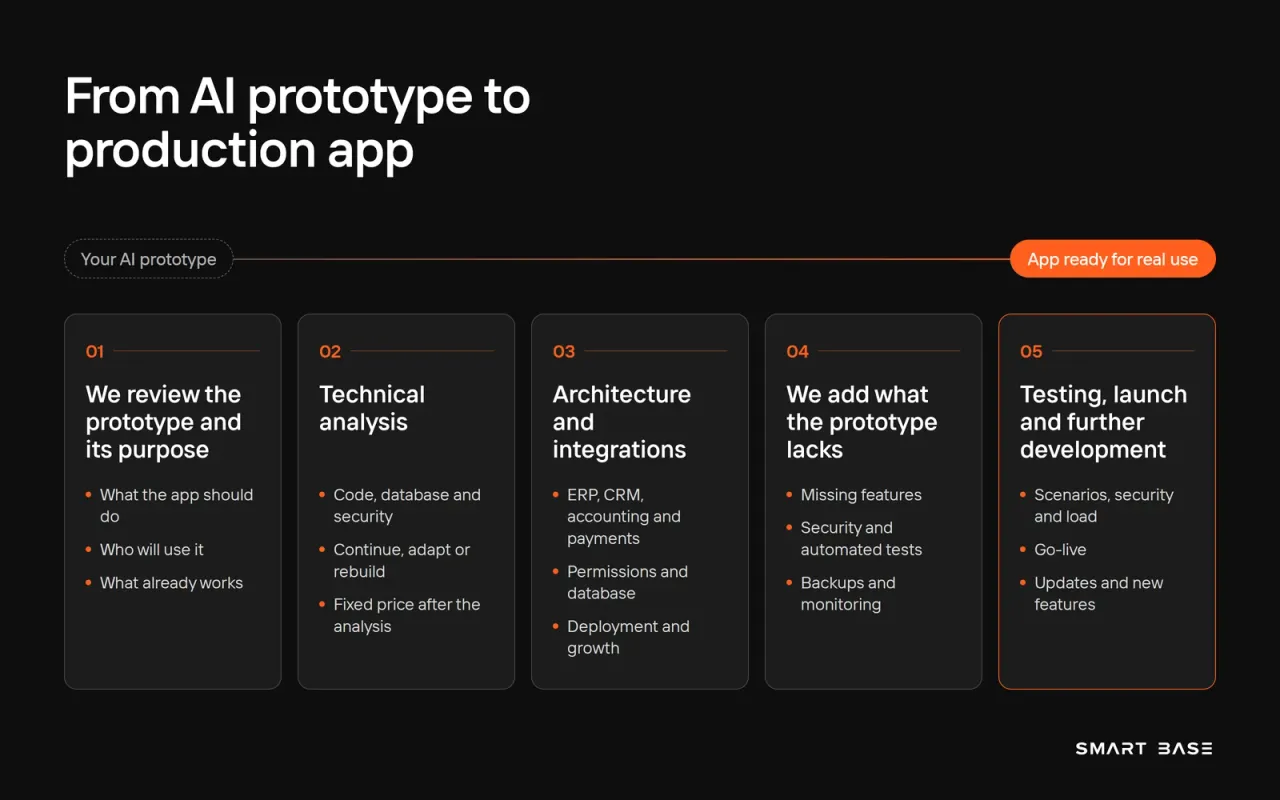
Step 1: we look at your prototype and its purpose
We need to understand what the app should do, who will use it and what problems it should solve. We want to know what already works and what has to change when a simple tool becomes part of the company’s day-to-day operations. At this stage your prototype helps us understand your ideas and user scenarios faster.
Step 2: we carry out a technical analysis
In the technical analysis we examine the existing code, the database, security, the technologies used and the options for further development. We then assess whether it makes more sense to continue with the existing solution, rework parts of it or build some components from scratch.
Not every AI prototype is suitable for further development. Sometimes it makes more economic sense to keep the user interface design and build the technical core of the app differently. After the analysis you get a fixed price.
Step 3: we design the architecture and integrations
If the app needs to communicate with ERP, CRM, accounting, a payment gateway or other services, we design how to connect them securely and reliably. We also deal with user permissions, the database structure, the deployment process and future extensions. We make the system only as complex as the company’s needs and planned growth require.
Step 4: we add what the prototype lacks
Based on the results of the analysis, we add the missing features, security measures, automated tests, backups, monitoring and other parts needed to run the app.
Step 5: we test, launch and keep developing the app
Before launch we verify the main user scenarios, security, integrations and behaviour under the expected load. Development continues after launch, because the app needs updates, fixes, technical oversight and often new features as the company’s needs change.
How SmartBase uses AI in app development
AI is a routine part of our work. It helps our developers write code, create tests, analyse existing solutions, write documentation and handle repetitive programming tasks. That leaves more time for understanding the client’s business, designing the architecture, complex integrations and quality control. We also deploy AI directly in our clients’ companies, from process analysis to AI agents connected to their systems. Read more on our AI solutions for businesses page.
Since 2013 we have been building and running online stores, B2B portals and internal systems connected to dozens of ERP and CRM systems, so we know where apps like these fail in practice. When working with an AI agent, taste and judgement are what count: knowing what to ask the AI for, which of its suggestions to accept and which to discard. Only then does the app stay easy to use and open to further development.
So the difference between vibe coding without technical experience and AI-assisted development does not lie in the tool itself. An experienced developer can judge whether the result is correct, secure, maintainable and fit for its specific purpose. Responsibility for the final solution therefore stays with people.
Do you still need a development company now that AI exists?
It depends on what you are building. If you need a simple brochure website, a prototype or a lightweight internal tool, an AI solution may be quite enough. For simple websites there are also good ready-made platforms, and custom development often does not pay off.
If, however, the app processes customer data, takes payments, manages orders, communicates with an ERP or underpins the company’s daily operations, the requirements are different. Then you are paying for analysis, architecture, security, testing, integrations, reliability and the ability to develop the system further. These areas decide whether the app will help your business in the long term or become yet another problem to solve.
Frequently asked questions (FAQ)
A prototype or a simple internal tool, yes. AI tools create the user interface, the database and the basic logic of an app from a text brief. An app that a company’s daily operations depend on, or that customers use, needs more: above all verified security, a well-thought-out architecture, tests and someone to maintain and develop it.
Do you have an app built with AI?
If you already have a working AI prototype, we will assess its technical state, identify the risks and propose how to turn it into a reliable app ready for real-world use. After the analysis you get a fixed price and a plan showing which parts of the prototype will be kept.
At SmartBase we specialise in custom web application and software development, including integrations with ERP, CRM and other business systems.